
How it works
Connect, See, Prove.
From a read-only login on your customers' kit to one ticket your engineer can act on. Our server makes every decision. A small collector on site only reads and sends.
One ticket after 2 checks in a row.
01 Connect
Pick the maker. Add a read-only login.
You tell Middlewatch which makers you run, with a read-only login for each. Three questions, then it tests the login and tells you what it can see. Kit on site is read by a small collector. Cloud-managed kit, Cisco Meraki first, is read directly by our service, with no box on site. Kit you connect is monitored from the start.
- Which maker is it?
- What will this login cover?
- What is the login?
02 See
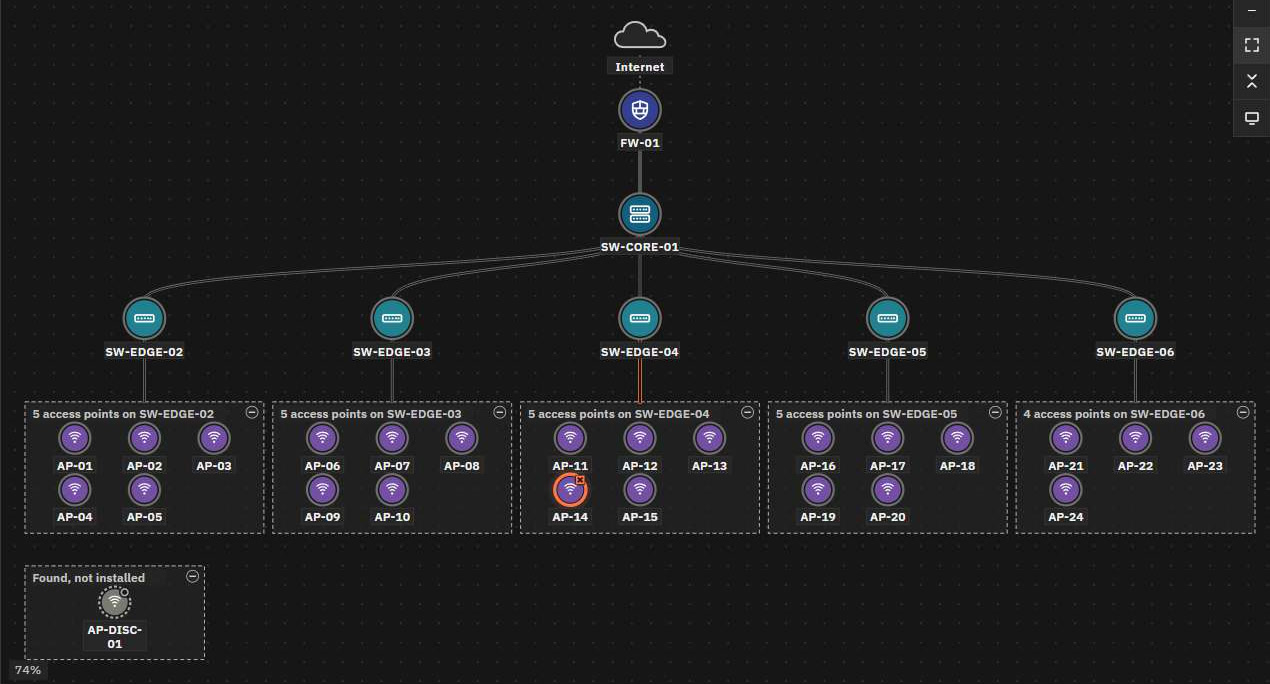
Every site as a map, with the fault ringed.
Home lists the sites that need a person, worst first. Open one to see its firewall, switches and access points as they are cabled. Red means not answering. Grey means not checked, and it is never shown as healthy.
03 Prove
Two checks, one ticket, its reasoning attached.
A single missed reply raises nothing. When a second check agrees, one ticket goes to your service desk, unassigned, with a private note: what was checked, what could not be checked, and how sure it is.
Private note on the ticket Automated checks
What Middlewatch checked and found
- The Ruckus vSZ reports an active alarm on AP-14: AP disconnected.
- The alarm on the controller: AP disconnected (major) since 17 Nov, 18:09.
- The Ruckus vSZ reports AP-14 as offline.
- 23 of the 23 other access points at Greenfield Primary School are answering.
- The device it connects through, SW-EDGE-04 (port 4), is answering, so the problem is most likely this device or its cable.
- 1 other device is grouped under this ticket, so it does not each get one: SW-EDGE-04.
What could NOT be checked
- Port and interface readings (SNMP): not set up for this device.
- Power, cabling and anything physical on site: Middlewatch cannot see these remotely.
Confidence: high that the fault is with AP-14 itself or its cable. Other access points at the site are answering, so the site's connection is working.
Your service desk: you decide when tickets start
You start in Watch only, and move on when you trust what it finds. A failure behind one device is one ticket, not one for every device behind it.
- Watch only
Middlewatch finds faults and sends nothing to your service desk.
- Practice
Tickets go to a test department on your service desk, not the real one.
- Live
Tickets go to your service desk.